> For the complete documentation index, see [llms.txt](https://fieldworker.gitbook.io/fieldworker-docs/llms.txt). Markdown versions of documentation pages are available by appending `.md` to page URLs; this page is available as [Markdown](https://fieldworker.gitbook.io/fieldworker-docs/fundamentals/pages/mt-monitoring-tool.md).
# MT (Monitoring Tool)
An MT, or Monitoring Tool is a key document capturing progress of a consumer, as collected during a mandatory monthly contact.
## Monitoring Tool for IDD in New Jersey
In New Jersey, [monitoring tools](/fieldworker-docs/fundamentals/concepts/monitoring-tool.md) for Intellectual and Developmental Disabilities (IDD) provide valuable insights into service efficacy and needs assessments.
### Features
* **Data Collection**: Aggregates data on service usage, client progress, and resource allocation.
* **Reporting**: Generates reports for stakeholders to review key metrics.
* **Alerts**: Notifies service providers of any deviations or urgent requirements for client care.
* **Integration**: Compatible with existing state databases and care management systems.
### Benefits
* **Improved Oversight**: Enhances the state's ability to track and manage IDD services.
* **Data-Driven Decisions**: Empowers agencies to make informed decisions based on real-time data.
* **Quality Assurance**: Ensures high standards of care through consistent monitoring.
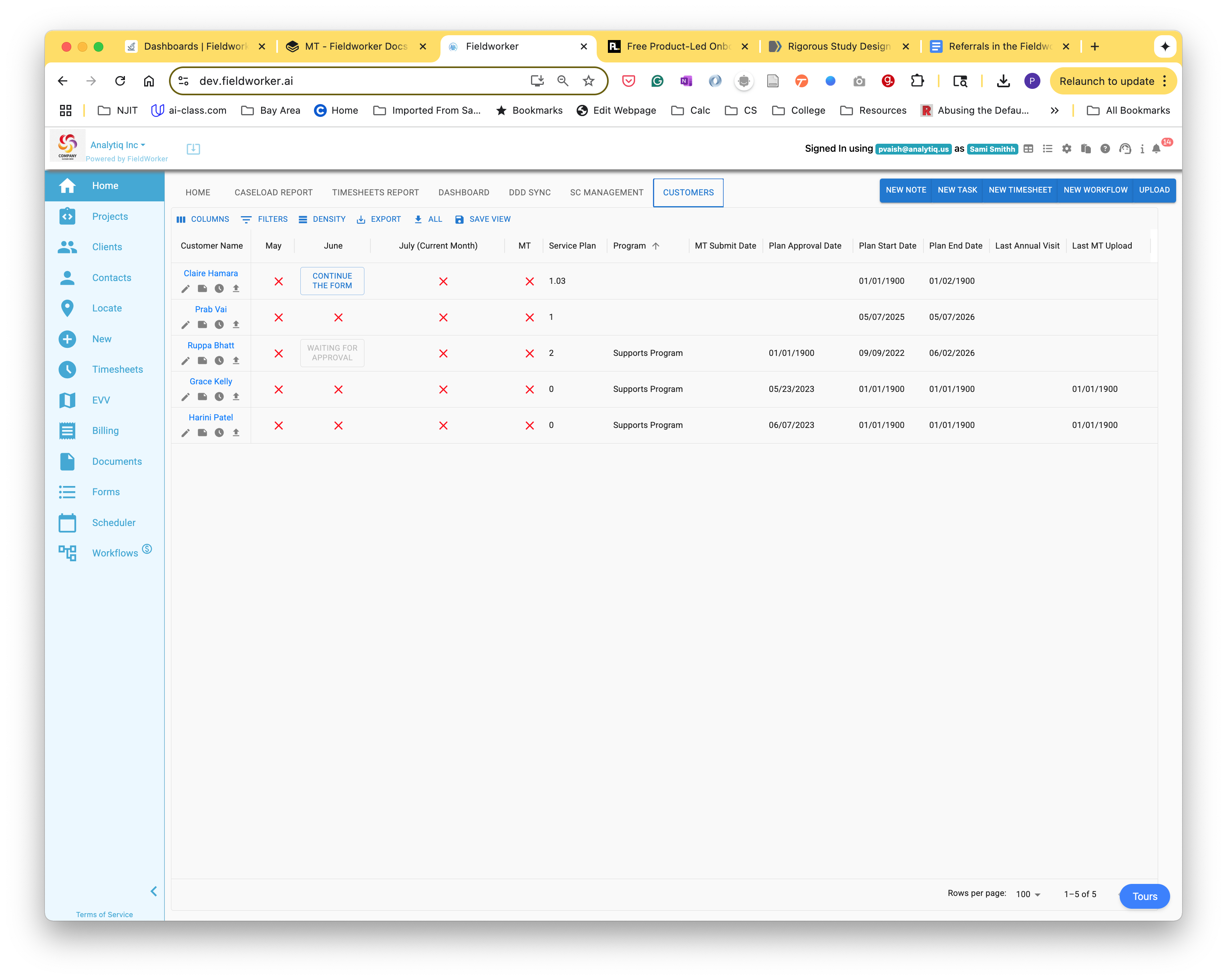
If you are a Support Coordination agency in New Jersey, your employees will be working on [completing a monitoring tool ](/fieldworker-docs/fundamentals/faq/how-to/create-a-monitoring-tool-using-fieldworker.md)(MT) every month. The Customer tab on your landing page presents a dashboard, allowing you access to all your customers, their tasks, and MTs.
The page also displays several other key dates that are relevant to the [customer](/fieldworker-docs/fundamentals/concepts/customer.md).
To initiate a new MT, use the (+) sign next to a task to open a new tool for this task.
Once an MT is initiated, click \ to work on and complete the MT. Once the MT is submitted, the status is displayed as \[WAITING FOR APPROVAL].
#### Monthly Monitoring Tool
The Monthly Monitoring Tool (MT) is a digital version of the NJ Division of Developmental Disabilities (DDD) compliance form. It is organized into 11 distinct sections that guide a Support Coordinator (SC) through a comprehensive review of a participant's well-being and service delivery.
Here is a description of every section based on the [current view](https://dev.fieldworker.ai/):
#### Section 1: Identifying Information
This is the foundational section of the report. It contains the primary data points for the participant and the SC, including:
* Participant name and DDD ID.
* The specific month being monitored.
* Information regarding the primary caregiver or guardian.
* The location where the contact took place (e.g., home, community, or remote).
#### Section 2: Follow-Up Items from Previous Months’ Contact
This section ensures continuity of care. It pulls in unresolved issues or "to-do" items identified in the prior month's report. The SC must document the current status of these items to show that the agency is actively working on participant needs.
#### Section 3: Outcomes and Services
Focuses on the Individualized Service Plan (ISP). The SC reviews whether the services authorized in the plan (like Day Habilitation or Individual Supports) are actually being delivered and if they are helping the participant achieve their stated personal goals.
#### Section 4: Continuity and Stability with Living Arrangement
This section monitors the participant's housing situation. It asks questions to ensure the living arrangement remains stable, safe, and appropriate for the participant's needs, and identifies any potential risks of displacement or changes in the household.
#### Section 5: Health and Safety
One of the most critical sections for compliance. It covers:
* Any recent medical appointments or ER visits.
* Changes in medication or health status.
* Verification that there are no signs of abuse, neglect, or exploitation.
* Confirmation that the participant has access to necessary medical supplies or equipment.
#### Section 6: Medicaid Status
Since services are funded through Medicaid waivers, this section tracks the participant's eligibility status. The SC confirms that Medicaid remains active and notes if a redetermination is pending to avoid any interruption in funding.
#### Section 7: Areas Requiring Division Assistance
If there are systemic issues that the SC or the agency cannot resolve alone—such as issues with state-contracted transportation or complex waiver technicalities—this section is used to flag them for the DDD.
#### Section 8: Closing Question for the Individual/Caregiver
This provides a space for the "voice" of the participant. It usually documents a direct question asked to the participant or their representative about their satisfaction with their current services and if they have any immediate concerns.
#### Section 9: Contact Summary
A narrative section where the SC provides a concise but detailed summary of the monthly contact. It ties together the observations made across the previous sections into a cohesive professional note.
#### Section 10: Completed By
This is the electronic signature area for the Support Coordinator. It includes their name, title, and the date the form was finalized.
#### Section 11: Reviewed By
This section is for administrative oversight. It is typically completed by a supervisor or an agency admin to verify that the report is accurate, compliant, and ready for a state audit.
> Workflow Note: The tool includes an Autosave feature (visible at the bottom) and allows for a side-by-side view of Follow Up Comments to help the coordinator maintain accuracy while moving through these 11 sections.
#### Quarterly Monitoring Tool
The Quarterly Monitoring Tool (MT) on the [FieldWorker platform](https://dev.fieldworker.ai/) is an expanded version of the monthly form, designed to meet the rigorous oversight requirements of the NJ Division of Developmental Disabilities (DDD).
While the Monthly MT is a "pulse check," the Quarterly MT is a comprehensive audit of the participant’s entire support system.
#### The 16 Sections of the Quarterly MT
The Quarterly tool expands from 11 to 16 sections to capture a deeper level of detail regarding the participant's community integration and personal rights:
1. Section 1: Identifying Information: Basic demographics and contact details.
2. Section 2: Follow-Up Items: Unresolved issues from previous months (populated from the *Follow-Up Comments* sidebar).
3. Section 3: Community Connections: Documents how the participant is engaging with their local community outside of their home.
4. Section 4: Relationships: Tracks the status of personal and professional relationships and any changes in the support network.
5. Section 5: Personal Rights and Autonomy: Ensures the participant is exercising choice, has privacy, and is treated with dignity.
6. Section 6: Continuity and Stability with Living Arrangement: Deep dive into the safety and permanence of the current housing.
7. Section 7: Employment and Day Services: Detailed review of the participant's progress in work or day habilitation programs.
8. Section 8: Outcomes and Services: Verification that ISP goals are being met.
9. Section 9: Health and Safety: Comprehensive medical review, including medications and incident reports.
10. Section 10: Medicaid Status: Verification of ongoing waiver eligibility.
11. Section 11: Closing Question for Individual/Caregiver: Qualitative feedback.
12. Section 12: To be Answered by the Support Coordinator: Professional assessment of whether the participant's needs are being met.
13. Section 13: Areas Requiring Division Assistance: Flagging systemic issues for the DDD.
14. Section 14: Contact Summary: The overall narrative of the quarterly visit.
15. Section 15: Completed By: Support Coordinator's digital signature.
16. Section 16: Reviewed By: Supervisor/Admin approval signature.
#### Logic and Special Handling
The FieldWorker platform applies several layers of logic to this form to ensure compliance and reduce administrative burden:
* Frequency Logic: The system tracks the "Last Quarterly Date." If a Quarterly MT is not completed within a 90-day window, the Compliance Health Bar on the [Dashboard](https://dev.fieldworker.ai/) will turn red, and the [Caseload Report](https://dev.fieldworker.ai/) will flag the missing "Q" badge.
* Data Persistence (The "Follow-Up" Engine): Section 2 is logically linked to previous reports. Any "unresolved" item from a prior Monthly or Quarterly MT is automatically pulled into the Follow Up Comments sidebar. A coordinator cannot "Submit" a new MT until these previous items are addressed or marked as ongoing.
* Conditional Visibility: Depending on the "Program Type" (e.g., Supports Program vs. CCP), certain questions within Section 7 or Section 8 may change to align with the specific requirements of that waiver.
* Validation Rules: The [SUBMIT](https://dev.fieldworker.ai/) button remains inactive or triggers an error list if "Hard Stop" fields (like Medicaid status or Health/Safety checks) are left blank.
* Autosave & State Recovery: To prevent data loss during long interviews in areas with poor connectivity, the tool includes an Autosave feature (currently visible at the bottom of your screen) that syncs data every few seconds.
* The "Monthly/Quarterly" Toggle: The tool allows an SC to switch views at the top of the modal. If an SC begins a Monthly MT but realizes a Quarterly is due, the logic allows them to switch, carrying over any shared data points (like Section 1 and Section 9) to the new form type.
> Admin Tip: Use the Reviewed By (Section 16) logic to implement an internal Quality Assurance (QA) workflow. Forms are not considered "Final" for state audits until the Admin or Supervisor has digitally signed off in this section.
For your MT Revier users, all submitted MTs are available on your dashboard.
Click on \ to open the submitted MT, and either approve it or reject it by providing appropriate comments.